
4G/5G LTE filters · Newcastle & the Hunter
4G/5G LTE Filters for TV Antennas
If your TV pixelates or loses channels on a clear, calm day, the weather isn’t the problem. Often it’s a nearby 4G/5G mobile tower, whose signal sits just above the TV channels and gets into an antenna with no filter. Mark Jamieson fixes it across Newcastle, Lake Macquarie, Port Stephens and the Hunter, with a filter in the right place or a new digital antenna that has one built in.
- 5.0 from 565 Google reviews
- Same dayLocal service across the Hunter
- ACRSRegistered Cable Licence
- No call-out feeFree quotes, 7 days a week
Signs a mobile tower is interfering with your TV
Mobile tower interference looks like any other reception fault at first, which is why it gets missed. The difference is the pattern. Watch for these:
- The picture pixelates, freezes or says “no signal” on a clear, calm day, when nothing outside has changed.
- Some channels break up while others stay fine.
- The problem comes and goes through the day with no link to the weather.
- Your antenna went up before 2015, or the system has an amplifier (a booster) in the roof or behind a TV.
- It started recently and nothing has been touched, which can mean a mobile tower nearby has been added or upgraded.
Plenty of other faults look similar, and those are repair jobs: water in an old connector, a cable chewed through in the roof, an antenna knocked off line in a storm. If it’s a plain “no signal” message, start with why your TV says no signal, which covers the checks you can do yourself first.
Why mobile towers break up the TV picture
It comes down to neighbours on the radio dial. Free-to-air TV ends at 694 MHz. In 2015, after the TV channels were moved down to make room, mobile networks started using the frequencies just above that for 4G, and 5G now shares those bands too. The two signals sit right next to each other.
An antenna made before then usually has nothing to keep the mobile signal out. Close to a tower, that mobile signal can be far stronger than the TV signal coming from Mount Sugarloaf, and the TV can’t cope with both at once.
An amplifier makes it worse. It boosts everything the antenna picks up, the mobile signal included, until the system overloads and the picture breaks up. Most antenna systems around here don’t need an amplifier at all, but some still have one, possibly fitted years ago by an uncertified technician.
A 4G/5G LTE filter blocks everything above 694 MHz and lets the TV channels through. Every digital TV antenna Mark installs has one built in, which also protects your picture as the mobile networks keep upgrading. It’s part of every digital TV antenna installation he does.
A filter on your old antenna, or a new antenna with one built in?
There are two ways to fix it, and the right one depends on your antenna and how it’s wired. Mark tells you which after testing.
| Filter added to your existing system | New antenna with a built-in filter | |
|---|---|---|
| Best when | The antenna itself is sound and the interference is mild | The antenna is old, damaged or on a tall mast, or the interference is strong |
| Where it goes | Between the antenna and any amplifier, never after it | Built into the antenna, before anything else in the system |
| The amplifier | Left in only if the signal test says it’s needed | Usually taken out, as most homes here don’t need one |
| Future upgrades | Covers the bands it was made for | Blocks everything above 694 MHz, as the networks keep upgrading |
Can you fix mobile interference yourself?
Sometimes, if the fault really is mobile interference and the filter goes in the right spot. A filter screwed in behind the TV, after an amplifier, won’t help, because the amplifier has already boosted the mobile signal by then. In most houses the right spot is up in the roof cavity, so for a lot of people this ends up being a job for someone with a ladder and a signal meter. Please don’t go up on the roof yourself.
How Mark fixes it
- Tests first. He checks the signal at the roof and at each TV with a meter, which shows whether mobile interference is there or the fault is something else, like a failed connector.
- Finds the amplifier. If there’s a booster in the system, he checks whether you need it. Usually you don’t.
- Filters in the right place. Either a filter fitted between the antenna and the rest of the system, or a new digital antenna with the filter built in, mounted and aimed for the strongest signal.
- Tests again. Every TV is checked before he leaves, so you know it’s fixed.
When you ring, tell him when the problem happens, whether every TV is affected, and roughly when the antenna went up. Those answers tell him most of what he needs before he arrives. There’s no call-out fee, and the quote is free, so ring him or send a quote request.
What decides the cost of fixing mobile interference?
Mostly which fix your system needs. A filter added to an antenna that is otherwise sound is the smaller job. A new digital antenna with the filter built in is a bigger one, and taking out an old amplifier or a tall mast at the same visit adds to it. How easy the roof is to get to matters too, and every TV gets retested before Mark leaves. When you ring, tell him what the TV is doing and roughly when the antenna went up.
Mark has no price list, because two homes rarely need the same work, and the quote is free. For a smaller job he can often give you a rough idea over the phone.
Mobile interference around Newcastle and the Hunter
Most of Newcastle and Lake Macquarie gets its TV from the transmitters on Mount Sugarloaf, so plenty of homes have a strong TV signal. That’s the trap: when the picture breaks up anyway, people assume the signal is weak and buy a booster, which can make mobile interference worse.
The homes Mark sees it in most are older ones with an antenna that has been up for a decade or more, often with an amplifier somebody added to chase a better picture. Suburbs close to mobile towers, and streets where a tower has recently been upgraded, are where it tends to show up first. He covers the whole region, from the Newcastle suburbs out to Maitland, Port Stephens and the Hunter Valley.
Recent job
A Maryland home losing channels on clear days, fixed with a built-in filter
The owners had channels pixelating and dropping out even on clear, calm days. Signal testing showed interference from nearby 4G/5G mobile towers. Their older antenna had no filter, and a signal amplifier was boosting the mobile signal along with the TV broadcast, which overloaded the system.
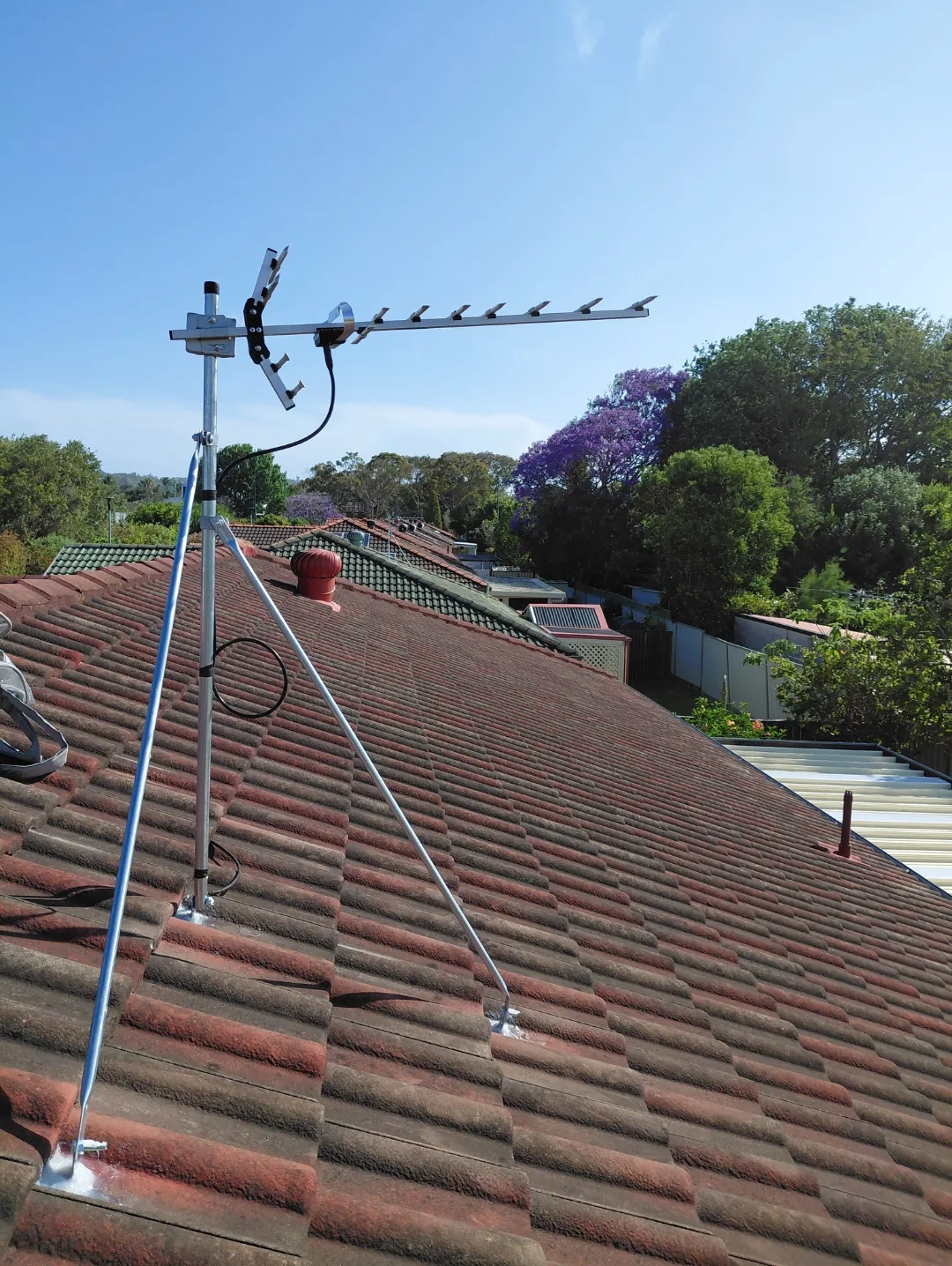
Mark replaced the old aerial with a new digital TV antenna with a built-in 4G/5G LTE filter, on a braced mount across the tile roof, the one in the photo at the top of this page. The mobile interference stopped and every room got a clean, reliable picture back. There’s more on this job in TV antennas in Maryland.
FAQ
4G/5G filter questions Mark gets asked
Anything else? Mark would rather you just asked.
Call 0408 563 949What does a 4G/5G LTE filter on a TV antenna do?
It lets the TV channels through and blocks the mobile phone signals just above them. Free-to-air TV ends at 694 MHz and 4G/5G mobile networks start just above that, so without a filter a strong mobile signal gets into the antenna with the TV and can swamp it. Every antenna Mark installs has the filter built in.
How do I know a mobile tower is causing my TV problems?
The tell-tale signs are pixelation or missing channels on a clear, calm day, problems that come and go without any change in the weather, and an antenna system with an old amplifier. None of those prove it on their own, though. Mark tests the signal at your roof and at each TV, which shows whether mobile interference is there.
Can I just buy a plug-in 4G filter?
Sometimes that’s enough, if it goes in the right place. A filter has to sit before any amplifier, between the antenna and the amplifier, or the amplifier has already boosted the mobile signal and the filter can’t undo it. On an older antenna or an overloaded system, a new antenna with the filter built in is usually the better fix. See the comparison above.
Does a signal booster make 4G interference worse?
It can. An amplifier boosts everything the antenna picks up, including a strong mobile signal, and that can overload the system and break up the picture. Most antenna systems around Newcastle don’t need an amplifier at all, and some still have one fitted years ago. There’s more on that in whether TV antenna boosters actually work.
My antenna is from before 2015. Does it need a filter?
Very likely. Mobile networks started using the frequencies just above the TV band in 2015, after the TV channels were moved down to make room, so most antennas from before then were never made to block them. If your picture has started dropping out with nothing else changed, it’s worth a check.
Is there a call-out fee to check for mobile interference?
No. There’s no call-out fee and quotes are free. Ring Mark and describe what the TV is doing; for a smaller job he can often give you a rough idea over the phone.
Selected reviews
What people say about Mark fixing their reception

Free quote
Picture playing up? Call Mark.
No call-out fee, and quotes are free. Open 7 days. Smaller jobs priced over the phone, and often done on the spot.
0408 563 949